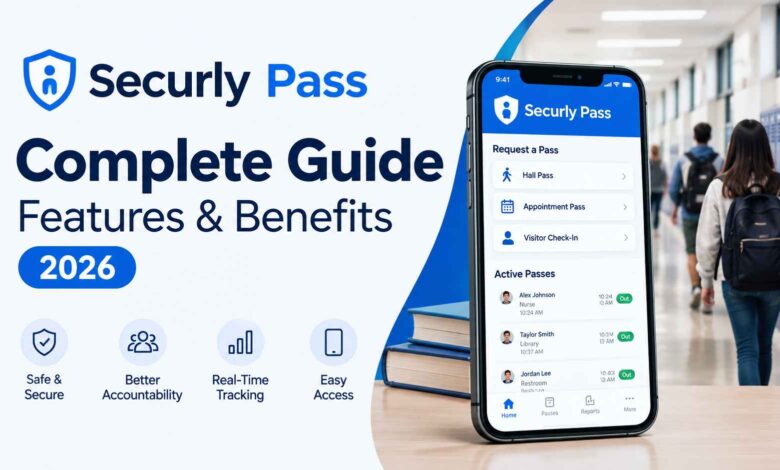
Securly Pass is a digital hall pass and campus movement management system designed for K–12 schools. Instead of relying on paper passes, it gives teachers and administrators a central way to manage student movement, approve passes, set limits, and view active passes in real time.
Securly Pass goes beyond a simple digital replacement for paper. Its current feature set includes hall passes, pass limits, location controls, appointment passes, Proxy Pass, Pass Kiosk, reporting, tardy management, and visitor management.
If you’re researching Securly Pass for a school or district, this guide explains how it works, its main features, privacy considerations, advantages and limitations, and what schools should know before adopting it.
What Is Securly Pass?
Securly Pass is a digital hall pass system for K–12 schools that helps staff manage when students leave class and where they are expected to go.
Students can request a pass through a device or kiosk, while teachers can approve requests and administrators can monitor active passes from a central dashboard. The system records information such as the destination, approval, and duration of a pass.
Securly describes Pass as a broader campus movement solution, because the platform also includes tools for tardy management, visitor management, appointment scheduling, and reporting.
The main idea is straightforward: replace a paper-based process with a digital system that gives authorized staff better visibility into student movement.
How Does Securly Pass Work?
The basic workflow depends on how a school configures the platform, but a typical process looks like this:
- A student requests a pass. The student selects an appropriate destination and submits the request.
- The request is reviewed. A teacher can approve or deny it, or a school can configure automatic pass options.
- The pass becomes active. Staff can see the student, destination, and time associated with the active pass.
- The student travels to the approved destination.
- Arrival is confirmed or the pass eventually ends. Securly says its system can count pass time upward and keep the pass active until arrival is confirmed by an authorized adult, while automatic expiration can also be configured.
This gives schools a more structured alternative to simply handing a student a signed piece of paper.
9 Key Features of Securly Pass
Securly Pass includes several features that address different parts of student movement management.
1. Live Hall Pass Dashboard
The live dashboard gives staff an overview of active passes, including the student, destination, and time out of class.
This can be useful when administrators need to quickly understand who is currently out of class rather than relying on separate paper records.
2. Student Pass Limits
Schools can configure limits for student-created hall passes. Securly’s current documentation says limits can be applied by student, group, grade, or schoolwide.
Importantly, teacher-created passes can still be used when a student has reached a limit, giving teachers a way to handle legitimate or urgent situations.
3. Location Pass Limits
Schools can control access to particular destinations and set capacity limits for locations.
For example, a school could restrict passes to a room when it has reached its configured maximum. This can help reduce unnecessary crowding in busy areas.
4. Contact Controls
Contact controls allow schools to prevent specific students from having active hall passes at the same time.
This feature can be configured to address particular student-movement concerns without requiring staff to manually monitor every combination of students.
5. Proxy Pass
Students do not always need to use their own device.
With Proxy Pass, teachers can issue a hall pass on behalf of a student. Securly specifically describes this as useful for students without devices and technology-free situations.
6. Pass Kiosk
A school can also use a shared device as a Pass Kiosk.
This can be useful in locations where students may not have their own devices, such as a gym, cafeteria, or front office.
7. Appointment Pass
Appointment Pass lets staff schedule appointments for individual students or groups.
Automatic reminders can also be sent to invited participants, making the feature useful when students need to leave class for scheduled meetings or services.
8. Reporting and Insights
Securly provides reporting tools that allow schools to examine pass activity and identify patterns.
Current product information describes district-wide reporting, destination trends, pass volume, and other insights that administrators can use to understand student movement.
9. Tardy and Visitor Management
Securly Pass is no longer limited to digital hall passes. The platform also includes tardy management and visitor management capabilities.
Securly says its visitor tools can validate visitor identities, while tardy management can help schools record and analyze tardiness.
What Are the Benefits of Securly Pass?
The value of a digital hall pass system depends on how a school uses it, but several practical benefits stand out.
Better Visibility Into Student Movement
A centralized dashboard gives authorized staff a current view of active passes instead of requiring them to collect information from individual classrooms.
Less Dependence on Paper
Digital requests and records reduce the need for handwritten hall passes and manual tracking.
More Consistent Pass Rules
Schools can establish limits, destinations, and other controls that can be applied according to their configured policies.
Useful Reporting
Digital records can give administrators information that would be difficult to collect consistently from paper slips.
Support During Emergencies
A live view of active passes can help staff identify students who are out of class and where they were headed during an emergency or drill.
Securly Pass vs. Paper Hall Passes
The biggest difference is how student movement is recorded and monitored.
| Feature | Paper Hall Pass | Securly Pass |
|---|---|---|
| Pass creation | Handwritten/manual | Digital |
| Active-pass visibility | Limited | Central dashboard |
| Pass limits | Usually manual | Configurable |
| Location controls | Manual | Available digitally |
| Reporting | Difficult to maintain | Digital reporting |
| Device-free students | Naturally supported | Proxy Pass and Kiosk options |
| Appointment scheduling | Separate process | Appointment Pass |
| Tardy/visitor tools | Separate | Available within the broader platform |
A digital system does not automatically make a school’s policies better, but it can make those policies easier to administer consistently.
Does Securly Pass Track Student Location?
This is an important distinction.
According to Securly’s current product information, Securly Pass does not use GPS to track the physical location of students or their devices. Instead, it records pass-related information such as the approved destination, timing, and approval status.
That means a school can see that a student has an active pass to a particular destination without the system functioning like a GPS tracking service.
The exact information available to staff can depend on the school’s configuration and permissions.
Want to explore another useful technology guide? Check out [ BB Mean in Slang: What Does BB Mean in Text?] for more practical information.
Is Securly Pass Safe for Student Privacy?
Privacy is an important consideration because a hall pass system handles information connected to students.
Securly states that Pass uses encryption and industry-standard security practices and that access is limited to authorized users. The company also states that its services comply with several privacy and accessibility frameworks, including FERPA and COPPA, and lists additional certifications and commitments on its official site.
Securly’s current product information says Pass uses basic school information such as student names and school email addresses, with some schools optionally including student ID numbers or grade levels.
However, schools and districts should still review their own contracts, configurations, retention policies, access controls, and applicable privacy requirements before deployment. A school’s implementation determines how the platform is actually used.
What Are the Pros and Cons of Securly Pass?
No software removes every challenge. A digital hall pass can improve organization, but schools still need suitable devices, connectivity, policies, and staff training.
| Pros | Cons |
|---|---|
| Centralized pass management | Requires technology and setup |
| Real-time visibility | Staff need to learn the system |
| Configurable pass limits | Policies still need human oversight |
| Digital reporting | Some schools may need additional configuration |
| Proxy Pass and Kiosk options | Dependence on the school’s technology environment |
| Appointment and location controls | Digital workflows may not suit every school equally |
The most important consideration is not simply whether the software has many features. Schools should determine whether those features match their actual movement-management policies and daily workflow.
How Much Does Securly Pass Cost?
Securly does not publish a universal public price on the main Pass product page. The company instead directs schools toward a demo or sales process.
That means the cost can vary based on the school’s or district’s requirements, configuration, and broader Securly products.
If you’re evaluating the platform, ask for a quote that clearly explains:
- Number of students and schools covered
- Included Pass features
- Visitor and tardy management
- Reporting capabilities
- Implementation or onboarding costs
- Training and support
- Contract length
- Any optional modules or services
Getting those details in writing makes it easier to understand the actual cost of adoption.
Who Can Use Securly Pass?
Securly Pass is primarily positioned for K–12 schools and districts.
It may be relevant to:
- Middle schools
- High schools
- Elementary schools
- Large school campuses
- Multi-school districts
- Schools replacing paper hall passes
- Schools looking for centralized student-movement reporting
The right configuration can differ considerably between a small elementary school and a large secondary campus, so schools should evaluate the platform against their specific routines.
Tips for Implementing Securly Pass
A successful rollout involves more than activating an account.
Establish Clear Pass Policies
Decide which destinations require passes, how long students can remain out, and which staff members can approve or issue passes.
Train Teachers Before Students
Teachers should understand approvals, limits, overrides, and emergency procedures before students begin using the system.
Plan for Students Without Devices
Use options such as Proxy Pass or Pass Kiosk where appropriate. Securly specifically provides these features for situations where students cannot use a personal device.
Review Reports After Launch
Look at pass volume, destinations, and recurring patterns to determine whether your policies are working as intended.
Keep Emergency Procedures Separate
A digital hall-pass system can support emergency awareness, but it should complement rather than replace a school’s established emergency procedures.
Frequently Asked Questions
What is Securly Pass used for?
Securly Pass is used to manage student movement through digital hall passes and related campus-management features. It provides tools for pass requests, approvals, limits, reporting, tardies, appointments, and visitor management.
Do students need a device to use Securly Pass?
No. Schools can use Proxy Pass for teacher-issued passes and Pass Kiosk for shared-device situations.
Does Securly Pass use GPS?
No. Securly says Pass does not use GPS to track students or devices. It records pass information such as the destination, time, and approval.
Can schools set hall pass limits?
Yes. Schools can configure student pass limits, including limits based on students, groups, grades, or schoolwide settings.
Can teachers override a student’s pass limit?
Yes. Securly’s support documentation states that teachers can create passes even when a student’s configured limit has been reached, including for emergencies or special circumstances.
Does Securly Pass include visitor management?
Yes. Visitor management is included within the broader Securly Pass platform and provides tools for visitor identity validation and related campus processes.
Does Securly Pass include tardy management?
Yes. Current Securly product information lists tardy management alongside digital hall passes, visitor management, and reporting.
Is Securly Pass free?
The official Pass page does not list a universal public price. Schools are directed to contact Securly for a demo and product information.
Final Thoughts
Securly Pass is more than a digital version of a paper hall pass. It combines student pass requests, teacher approvals, live visibility, configurable limits, destination controls, reporting, and additional campus-management tools in one platform.
For schools considering the system, the most important questions are practical: Does it fit your existing policies? Do teachers have the devices and training they need? How will you handle students without devices? And what student-data practices will apply to your implementation?
Answering those questions first can help a school determine whether Securly Pass fits its particular campus and workflow.